

8 Best Employee Time and Attendance Software for Events & Shift-Based Teams
Key Takeaways
- Time tracking for shift-based operations requires mobile-first GPS verification and real-time attendance monitoring to prevent time theft and buddy punching.
- Standard office-based time tracking systems fail in event settings because they cannot handle rotating shift patterns, multi-site deployments, or temporary agency labor pools.
- Essential platform features include geofenced clock-ins, automated timesheet generation, live attendance dashboards, and seamless payroll integrations.
- Ubeya provides a purpose-built platform connecting time attendance management directly with automated scheduling, mobile communication, and payroll preparation.
Coordinating workforce time tracking across dynamic venues, festivals, or multi-site shift operations presents massive administrative hurdles. When hundreds of temporary and hourly workers arrive at an event, tracking actual hours worked using paper sign-in sheets or physical punch clocks creates severe bottlenecks, payroll errors, and unmonitored labor costs.
Adopting specialized employee time and attendance software allows event producers and shift managers to capture accurate punch data, enforce location boundaries, and streamline timesheet approvals before processing payroll.
Why Time and Attendance Tracking Breaks Down for Shift-Based and Event Teams
Traditional time attendance management software assumes employees work from a fixed office location with static daily schedules. When applied to high-volume, event-based, or shift-based environments, legacy tools rapidly break down due to operational complexity:
- Multi-Site and Decentralized Footprints: Workers report to various gates, staging zones, or temporary venue builds across wide geographic areas, making physical clock-in stations impractical.
- Rotating Shifts and Fluid Schedules: Shift times fluctuate based on event run-of-show schedules, weather delays, and unpredictable client demands, causing static schedule rules to flag false attendance exceptions.
- Heavy Reliance on Temporary and Agency Staff: Event operations frequently blend internal teams, temporary hires, and third-party agency workers. Standard software struggles to track time across diverse employment classifications and varying pay rates.
- High Vulnerability to Time Theft: Without live GPS location verification, workers can clock in while stuck in traffic or have colleagues punch in for them, inflating labor expenses.
What to Look for in Employee Time and Attendance Software
Evaluating attendance tracking software for variable shift environments requires focusing on mobile accessibility, security, and administrative efficiency:
- Geofenced GPS Verification: The platform must enforce precise geographic perimeters around event venues or shift locations, ensuring workers can clock in only when physically present on site.
- Live Attendance Dashboards: Managers require real-time visibility into who has arrived, who is running late, and which posts remain vacant, allowing for immediate dispatch adjustments before gates open.
- Facial Recognition and Kiosk Modes: For venues preferring centralized clock-in stations, tablet kiosk modes with photo capture prevent buddy punching without slowing down crew entry lines.
- Automated Timesheet Reconciliation: The system should automatically match recorded clock-in/out timestamps against scheduled shifts, flagging overtime, late arrivals, and break violations for rapid approval.
- Direct Payroll Integrations: Seamless export capabilities to major payroll engines ensure verified time logs convert directly into accurate paychecks without manual spreadsheet data entry.
8 Best Employee Time and Attendance Software for Events and Shift-Based Teams
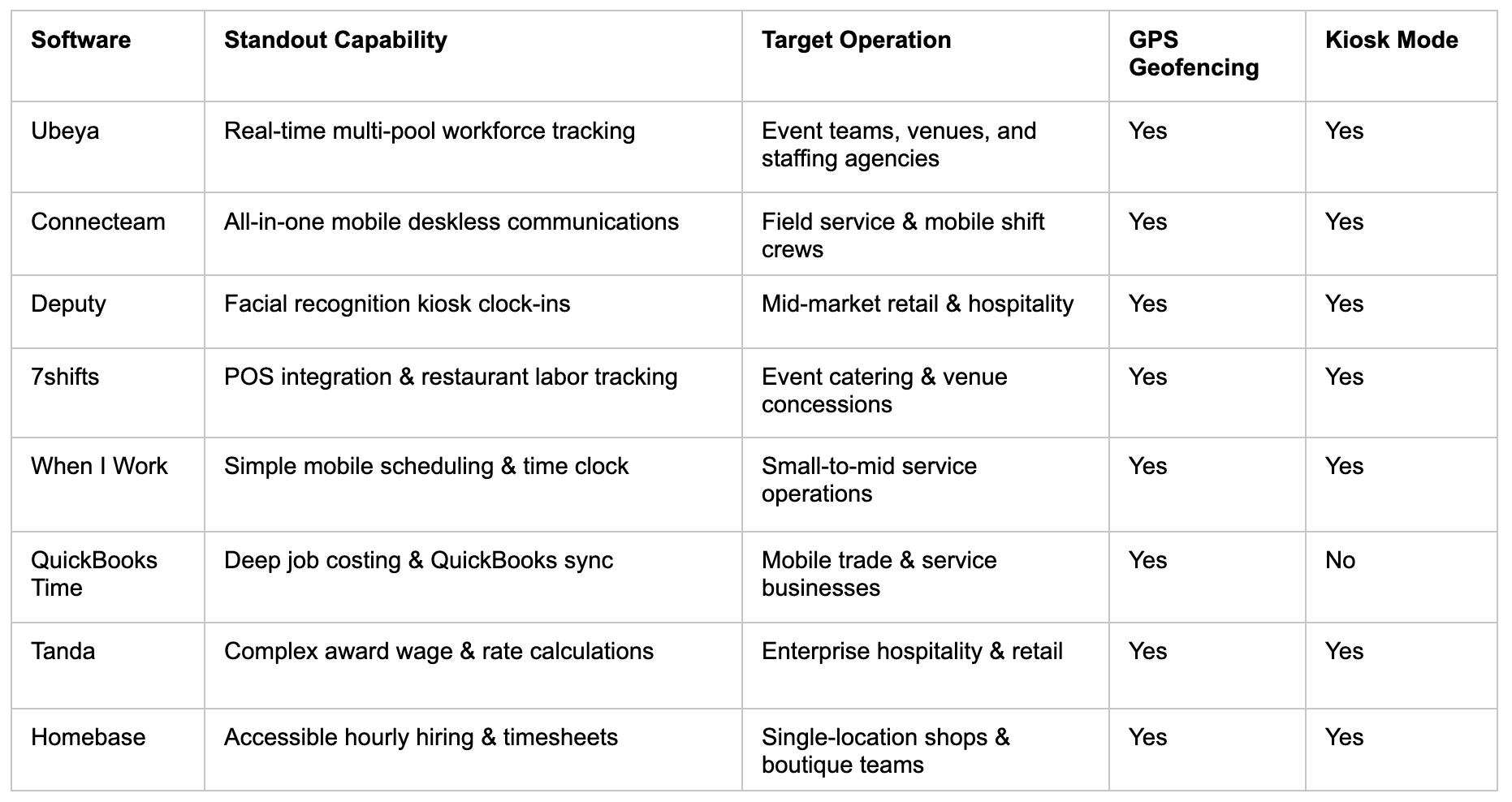
To help you select the right solution, we evaluated the eight best employee time and attendance software platforms designed to manage hourly, mobile, and shift-based workforces.
1. Ubeya
- Best For: Event producers, venue operators, staffing agencies, and catering companies managing complex, multi-site shift workforces and temporary labor pools.
Ubeya is an all-in-one workforce management platform engineered specifically for the fast-moving realities of shift-based and event operations. Rather than treating time tracking as an isolated task, Ubeya connects real-time attendance tracking directly with smart scheduling, worker communication, and payroll preparation.
Workers clock in and out using a native mobile app equipped with geofenced GPS verification, ensuring punches occur strictly within designated venue boundaries. Event managers gain access to a live attendance dashboard that displays real-time check-ins, flags tardiness, and alerts dispatchers to unfilled shifts. For high-density check-in points, Ubeya also offers tablet-based kiosk clock-ins. By automating timesheet reconciliation and supporting complex multi-tier pay structures across internal and agency workers, Ubeya eliminates manual payroll errors and protects event margins. Exploring the best event staff management software options illustrates how unifying attendance capture with roster scheduling streamlines end-to-end venue operations.
2. Connecteam
Connecteam offers a flexible mobile app designed for non-desk and field-based employees. Its time tracking module includes GPS geofencing, breadcrumb tracking, and automated shift reminders. Managers can review digital timesheets, approve shift edits, and export hours directly to payroll software. While highly adaptable for general field service teams, event operators managing complex multi-agency worker pools may require deeper agency-specific vendor tools.
3. Deputy
Deputy is a widely used scheduling and time tracking platform built for retail, hospitality, and healthcare teams. It provides tablet kiosk clock-ins with facial recognition, mobile GPS check-ins, and automated meal break tracking. Deputy excels at enforcing shift compliance rules and calculating wage premiums, though its structure is less tailored to managing multi-vendor event structures or rapid gig-style shift fulfillment.
4. 7shifts
7shifts is tailored specifically for the restaurant and food service industry, making it an excellent choice for event catering teams and venue concessions. The platform offers mobile and tablet time tracking, automated break enforcement, and labor cost tracking against live sales data. While highly effective for culinary operations, it lacks technical staging and security workflow features.
5. When I Work
When I Work provides an accessible scheduling and attendance tracking app tailored for small to mid-sized businesses. It allows employees to clock in via smartphone or fixed terminal, utilizing GPS verification to ensure location accuracy. The tool helps managers manage labor budgets and reduce overtime. However, large-scale venues requiring deep role-based credential tracking may find its feature set basic.
6. QuickBooks Time
QuickBooks Time (formerly TSheets) focuses heavily on mobile time tracking, GPS location tracking, and job costing. It allows mobile crews to clock in, assign hours to specific clients or projects, and sync time logs directly into QuickBooks payroll systems. While ideal for construction and mobile service crews, it lacks built-in shift bidding, worker communication, and event roster features.
7. Tanda
Tanda is a workforce management tool specializing in automated time capture, roster creation, and complex award wage interpretation. Workers clock in via a tablet time clock utilizing photo verification to eliminate buddy punching. Tanda’s powerful compliance engine automatically calculates complex wage rates, though setting up specialized shift patterns for short-term event operations can require initial technical setup.
8. Homebase
Homebase offers a user-friendly time tracking and scheduling platform engineered for local brick-and-mortar businesses and boutique event teams. It features GPS-based clock-ins, automated timesheet generation, and basic manager approval workflows. While highly cost-effective and simple to deploy, it lacks the multi-location enterprise scale required by major stadiums and international convention centers.
Software Comparison Across Key Features
How to Choose the Right Time and Attendance Tool for Your Operation
Selecting the right software requires matching platform capabilities to your team structure and operational environment:
Single-Location Venues and Hospitality
If you operate a fixed venue, venue concessions, or a restaurant, prioritize tools offering tablet kiosk modes with photo capture or facial recognition. Fast entry lines and precise break tracking are essential for controlling static venue labor costs.
High-Volume Event Operations and Agencies
If you manage temporary, flexible, or agency labor across large festival grounds or stadium venues, prioritize platforms featuring native mobile GPS geofencing, multi-agency workforce management, and real-time attendance dashboards. Selecting software built around the top roster management software features event staffing teams depend on ensures that attendance data links directly with live schedule dispatches.
Mobile Field Crews and Distributed Services
For small, highly mobile teams working short shifts across multiple regional job sites, focus on platforms offering lightweight mobile apps, simple job-costing tags, and direct accounting integrations.
Common Time and Attendance Mistakes That Cost Event Operators
Failing to modernize attendance tracking leads to systemic financial leakages and operational stress. Avoid these common pitfalls:
- Relying on Paper Sign-In Sheets: Paper logs invite illegible handwriting, manual data entry errors, and time rounding padding, adding significant unbudgeted labor costs over time.
- Ignoring Geofenced Boundaries: Allowing workers to clock in via mobile devices without enforcing strict GPS geofences enables remote clock-ins while staff are en route or off site.
- Delayed Attendance Monitoring: Waiting until after an event ends to review attendance prevents managers from spotting no-shows early enough to dispatch replacement staff before gates open.
- Manual Timesheet Reconciliation: Forcing payroll administrators to cross-reference raw timestamps against scheduled shifts manually wastes valuable time and increases payment discrepancy claims.
FAQs
Can time and attendance software integrate with payroll systems?
Yes. Modern workforce time tracking software features direct integrations or open APIs that connect to major payroll platforms. Approved digital timesheets, complete with regular hours, overtime calculations, and shift differentials, sync automatically to ensure accurate, timely worker payments.
Does time and attendance software support temp and agency workers?
Yes. Advanced platforms allow event organizers and staffing agencies to manage internal employees, temporary hires, and third-party agency staff within a single system. Managers can assign location-specific rates, track individual clock-ins, and generate separate billing reports for partner agencies.
Can employees clock in without a smartphone?
Yes. While mobile apps are standard for deskless workers, platforms also offer fixed tablet kiosk modes. Workers clock in at centralized entry points using personal PIN codes, facial recognition, or QR badges, ensuring accurate time capture for staff without smartphones.
How does GPS verification prevent time theft in shift teams?
GPS verification creates virtual geofences around assigned work sites. The software cross-references the worker's smartphone location against the designated boundary, allowing clock-in only when the employee is physically present inside the work zone, eliminating remote clock-ins.
What reports does time and attendance software generate?
Time attendance management software generates real-time reports detailing total hours worked, regular vs. overtime labor costs, tardiness trends, absence rates, break compliance, and variance between scheduled vs. actual labor expenditure across events and locations.
.jpg)

