

6 Best Employee Time Clock Apps for Hourly and Temp Workers
Key Takeaways
- Hourly and temporary workers require mobile-first time clocks with real-time location validation to prevent time theft, buddy punching, and attendance discrepancies across decentralized sites.
- Traditional hardware punches and desktop tools fail for flexible workforces because they cannot handle rotating shift rosters, multi-site deployments, or instant worker onboarding.
- Essential features to prioritize include geofenced GPS verification, offline clock-in capabilities, live attendance dashboards, and automated timesheet approvals.
- Deploying platforms like Ubeya connects time tracking directly with automated scheduling, mobile communication, and payroll-ready reporting.
Managing time tracking for hourly and temporary workforces across events, venues, retail, or field services is a continuous operational challenge. When shifts fluctuate and crews work across multiple job sites, relying on paper sign-in sheets or manual honor systems leads to inflated payroll costs, illegible logs, and administrative bottlenecks.
Adopting a dedicated employee time clock app allows operations leaders to capture accurate punch data in real time, enforce location boundaries, and automate timesheet reconciliation before processing payroll.
Why Hourly and Temp Workers Need a Different Approach to Time Tracking
Standard timekeeping software is built for corporate environments where salaried or fixed-hour employees sit at the same desks every day. When applied to hourly, temporary, or gig-based workforces, these traditional systems quickly break down.
First, deskless workers do not operate in front of computers. They report directly to venue gates, client sites, or temporary pop-up locations, making physical punch clocks impractical and expensive to install at scale.
Second, temporary crews experience high turnover and rapid rotation. Onboarding a temp worker into a legacy timekeeping platform often takes longer than the actual shift they were hired to work.
Finally, hourly operations are highly vulnerable to buddy punching and premature clock-ins. Without automated, mobile-first location and identity validation, managers spend hours auditing disputed timestamps instead of running active operations.
The Features That Matter Most in a Time Clock App for Hourly Teams
Evaluating a clock in clock out app for mobile or temporary teams requires looking past basic timers. Focus on operational features built for dynamic, on-the-ground conditions:
- Geofenced GPS Validation: The app must enforce geographic perimeters around work locations, allowing staff to clock in only when they are physically inside the designated work zone.
- Kiosk and Photo Verification Modes: For static entry points or high-volume arrivals, tablet kiosk modes with photo capture or PIN entry prevent buddy punching without bottlenecking entry lines.
- Offline Time Tracking: Work environments like underground stadium tunnels, remote outdoor festivals, or steel-frame warehouses often lack stable cell service. The app must cache timestamps locally and sync automatically when connectivity returns.
- Live Attendance Dashboards: Managers need real-time visibility into active shifts, tardiness alerts, and open vacancies to make immediate staffing adjustments before guest arrivals peak.
- Seamless Payroll Integration: Time logs should convert automatically into digital timesheets, applying complex shift differentials, overtime rules, and break compliance before exporting to payroll software.
6 Best Employee Time Clock Apps for Hourly and Temp Workers
To help you select the right software, we evaluated the six best employee time clock apps designed to manage flexible, hourly, and temporary workforces.
1. Ubeya
- Best For: Event operators, stadium venues, staffing agencies, and catering groups managing hourly crews, gig staff, and multi-agency labor pools.
Ubeya is an all-in-one workforce management platform engineered specifically for high-volume, shift-based, and temporary operations. Rather than treating time tracking as an isolated task, Ubeya unifies smart scheduling, worker communication, live time tracking, and payroll preparation into a single ecosystem.
Workers download a native mobile time clock app where they can view shift briefs, receive venue arrival instructions, and clock in via geofenced GPS verification. For high-density entry points, Ubeya also supports tablet-based kiosk clock-ins. Operations managers gain access to a live attendance dashboard that displays real-time check-ins across internal staff and third-party vendor pools. By automating timesheet reconciliation and verifying location compliance instantly, Ubeya eliminates payroll errors and protects operating margins.
Connecting these clock-in workflows directly with the best temporary workforce management software stadiums rely on allows managers to control cross-venue labor deployment effortlessly.
2. Connecteam
Connecteam is a broad deskless management app that provides a mobile time clock app alongside employee messaging and digital forms. Its time tracking module includes GPS geofencing, live breadcrumb tracking for mobile field teams, and automated break reminders. Managers can review digital timesheets on mobile devices and push approved hours directly to payroll. While highly adaptable for general field service crews, agencies managing multi-client vendor pools may find its agency-specific workflows somewhat basic.
3. Deputy
Deputy provides intuitive scheduling and time tracking tools designed for retail, hospitality, and healthcare teams. Its mobile app enables workers to clock in using GPS location checks, while its tablet kiosk mode utilizes facial recognition to prevent buddy punching. Deputy excels at enforcing meal break compliance and calculating overtime premiums, though its structure is less tailored to fast-paced gig-style dispatching or multi-agency venue management.
4. 7shifts
7shifts is tailored specifically for the restaurant and food service industry, making it an excellent choice for event catering teams, venue concessions, and hospitality groups. The app features mobile and tablet time clock modes, automated break tracking, and real-time labor cost tracking against point-of-sale sales data. While highly effective for culinary and concessions operations, it lacks specialized features for technical staging, security, or large venue logistics.
5. When I Work
When I Work offers an accessible scheduling and time tracking platform built for small-to-midsize hourly businesses. Its mobile time clock uses GPS verification to ensure workers are on site when logging hours, alerting managers to early clock-ins or overtime risks. While easy to set up and cost-effective for single-location or small-scale teams, enterprise venue operators managing complex credential tiers may require deeper operational controls.
6. QuickBooks Time
QuickBooks Time (formerly TSheets) focuses heavily on mobile time tracking, job costing, and location mapping. Field employees can clock in from their smartphones, attach time to specific client projects, and sync verified hours directly into QuickBooks payroll. While ideal for construction, trades, and mobile service teams, it lacks built-in shift bidding, candidate onboarding, and event messaging tools.
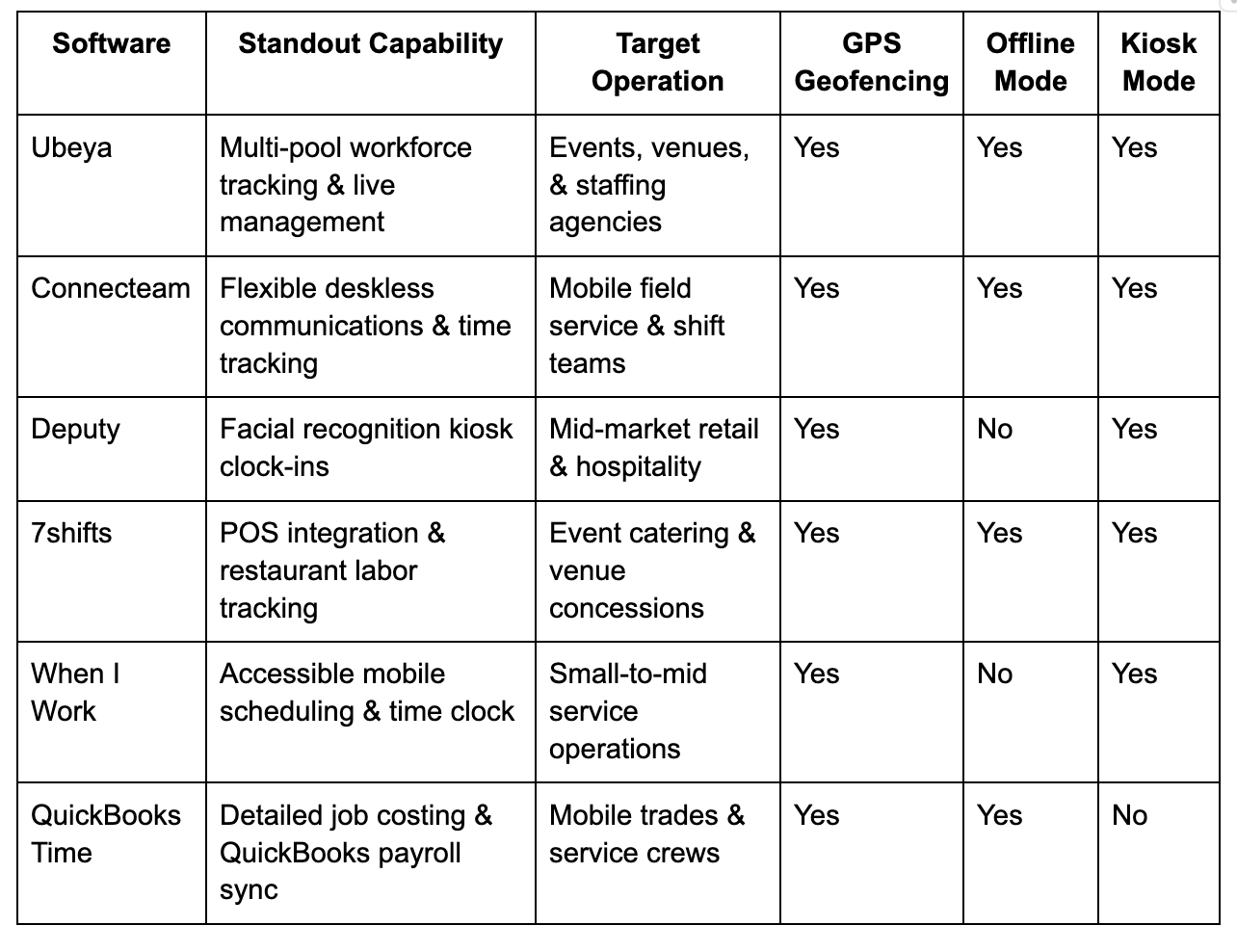
Software Comparison Across Key Features
How to Evaluate a Time Clock App Before Rolling It Out
Before selecting a platform for your hourly or temp workforce, test the software against these practical operational scenarios:
- How fast can a new temp worker log in and clock in? If onboarding requires lengthly email verification loops, your crew will face severe bottlenecks at entry gates.
- Does the GPS geofence hold up in dense or covered locations? Test the mobile app inside your specific work environments to ensure location checks operate smoothly.
- Can the software handle multi-rate or split-role shifts? If a worker performs two different roles at different pay rates during the same week, verify that the app applies the correct rate to the verified time log automatically.
- How does the app handle internet outages? Ensure the system caches timestamps locally so workers can clock in even when cellular coverage fails.
Reviewing the top features found in the top event staff scheduling software large events venues deploy helps guide your team toward tools that connect time tracking seamlessly with live roster management.
Ubeya
How to Get Hourly and Temp Workers to Actually Use a Time Clock App
Software is only effective if your workforce adopts it consistently. To drive high adoption rates across temporary and hourly teams:
- Eliminate Technical Friction: Utilize simple phone-number authentication or SMS magic links so workers do not need to memorize corporate passwords or set up email accounts.
- Mandate App Downloads During Onboarding: Include the app download link directly in the initial digital hiring packet, making app setup a required pre-requisite for shift assignment.
- Provide Clear Value to the Worker: Choose an app where staff can view their upcoming schedules, track estimated earnings, and request shift trades directly. When workers realize the app gives them schedule visibility, usage rises naturally.
- Use Kiosk Backups for Fast Entry: For large crews arriving simultaneously, set up tablet kiosks at entry points so staff without active smartphones can punch in quickly using a PIN or QR code.
FAQs
Can a time clock app work without internet access?
Yes, advanced apps offer offline time tracking modes. When working in remote venues or low-connectivity zones, the app records timestamps and GPS coordinates locally on the mobile device, automatically syncing data to the central management dashboard once a cellular or Wi-Fi connection is restored.
What happens when a worker forgets to clock out?
Modern platforms include automated auto-clock-out rules and manager notifications. If a worker forgets to clock out, the software flags the timesheet as an exception, alerting the shift supervisor to review the shift end time and manually adjust or approve the log before sending it to payroll.
Can one time clock app cover multiple job sites?
Yes. Cloud-based time clock apps allow managers to configure unlimited geofenced work sites. As hourly or temporary workers move between different venues or client locations throughout the week, the app automatically detects their location and attributes their worked hours to the correct job site and client bill rate.
How accurate is GPS clock-in for workers in large venues?
GPS geofencing accuracy typically ranges within 10 to 30 meters. For massive stadium environments or multi-level convention centers where GPS signals may fluctuate indoors, operators combine GPS checks with on-site QR code scanning or tablet kiosks to ensure precise location verification.
Do time clock apps comply with labor law timekeeping requirements?
Yes. Purpose-built time clock apps maintain unalterable digital audit trails of all clock-ins, clock-outs, meal breaks, and manager edits. These digital records comply with federal FLSA timekeeping mandates and state labor laws, protecting businesses during payroll audits.
.jpg)

